Adding Identifying Documentation
The user can add identifying documentation for the borrower/co-borrower.
To add identifying documents:
- In the LOANS tab, select Application > Borrower.
The Identifying Documentation section is located below the Ethnicity, Gender, and Race.
-
In the Identifying Documentation section, click the Add button.

-
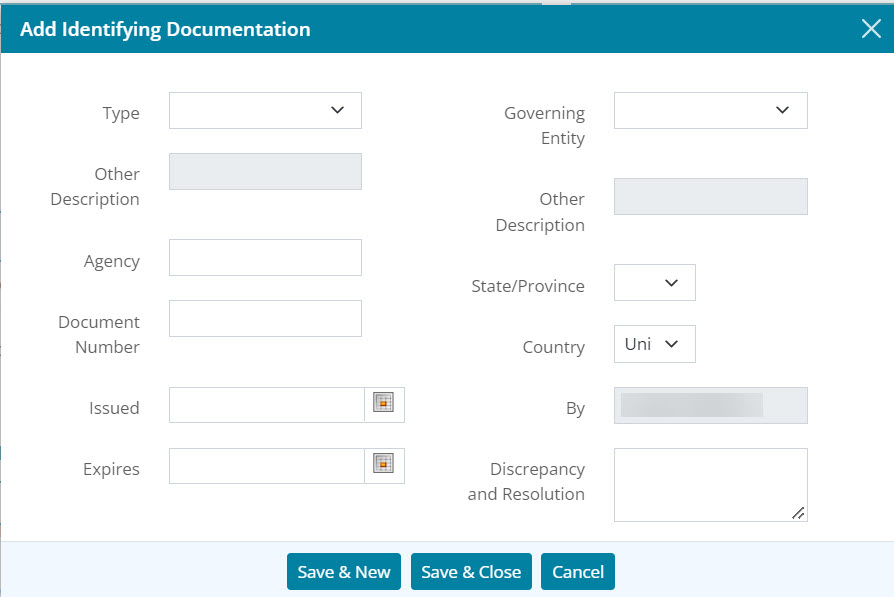
Select the Type of identifying documentation that will be added to the borrower’s loan file.
-
If the Other Type was selected, enter an Other Description.
-
Add an Agency.
-
Enter a Document Number.
-
Select the Calendar icon to add an Issued date.
-
Select the Calendar icon to add an expiration (Expires) date.
-
Select the Governing Entity drop down menu and select the desired option.
-
If the Other entity option was selected, enter a Other Description.
-
Select a State/Province.
-
Select a Country.
-
If needed, enter a Discrepancy and Resolution.
-
Click Save & New to add additional identifying documentation or click Save & Close to exit the dialog .
-
Click on the Save button at the top of the screen.
-
If needed, repeat these steps for the co-borrower.
Editing Identifying Documentation
Follow the steps below to edit any changes in the this section.
- In the LOANS tab, select Application > Borrower.
The Identifying Documentation section is located below the Ethnicity, Gender, and Race.
- Select the desired documentation.
.jpg)
- Update any desired information in the Add Identifying Documentation dialog.
.jpg)
- Click Save & Close.
- C lick on the Save button at the top of the screen.
Deleting Identifying Documentation
Use the following steps to delete an undesired document.
- In the LOANS tab, select Application > Borrower.
The Identifying Documentation section is located below the Ethnicity, Gender, and Race.
- Select the Delete icon associated with the undesired documentation.
.jpg)
- Click Delete button in the Delete Confirmation dialog.

- C lick on the Save button at the top of the screen.